
Leganto September 2026 Release Notes
October 2026 Sneak Preview
- More accessibility improvements across the interface
Main Features
Accessibility Improvements Across the Leganto User Interface
September 2026 Leganto URM-327852
Several improvements have been made to enhance accessibility in the Leganto user interface. Most notable improvements include:
-
Improved focus management throughout the user interface when closing pop-ups and side panes:
-
When users close a pop-up or side pane, focus now automatically returns to the button or menu item that opened it, enabling users to continue navigating from their previous location without losing context.
-
When error messages are displayed, the focus moves to the first invalid field.
-
The design of the focus circle was changed to provide more contrast on focused elements.
-
-
The Mark as broken button didn't include the link name, making it difficult for users who use screen readers to ensure they were marking the correct link as broken. This has been fixed.
-
In lists of items, such as the library search results, it was difficult for screen reader users to ensure they were performing actions on the correct item. Now actions such as Add include the item title.
-
Sections were previously not navigable as headers. This was fixed.
-
Heading levels in the right pane for Suggestions and Deleted items have been improved.
-
It was previously not possible to access the Add annotation feature using a screen reader. This has been fixed.
-
The number of suggestions was not previously announced by the screen reader. This was fixed.
-
Some loading indications, such as the list loading skeleton, previously did not have enough contrast. This was fixed.
Additional Enhancements
-
September 2026 Leganto Word exports now include improved accessibility support for users who rely on screen readers.
Exported Word files now retain the structural elements of the list, such as headings and sections, enabling assistive technologies to interpret and navigate the document more effectively.
This enhancement improves the accessibility of exported lists, making them easier to navigate and use with screen readers.URM-329529
The selected bibliographic style does not affect the accessibility of exported Word documents. -
September 2026 Leganto The design of the list section preview window has been changed to provide a clearer and more streamlined preview when creating a new list.
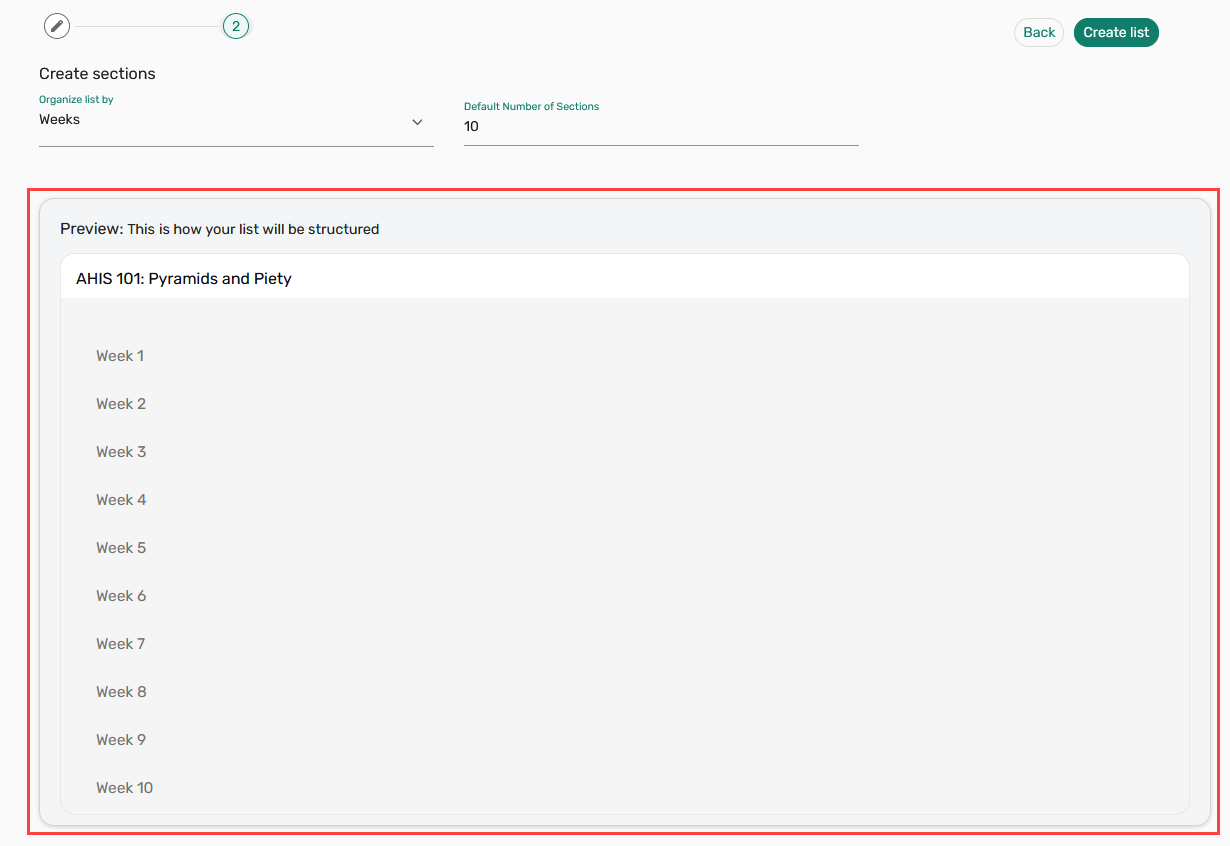
The preview area now features a gray background and includes the message This is how your list will be structured to clearly indicate that it is for reference only. The preview displays the list name and the selected sections or number of weeks, but no longer includes action buttons.
The separate scrollable preview container has also been removed, and the preview now scrolls with the rest of the page.
These enhancements reduce confusion by clearly indicating that the preview is not editable and is intended only to display the structure of the list being created. URM-329085
-
September 2026 Leganto The default Cite it! extension and bookmarklet description now includes a link to the Ex Libris privacy policy.
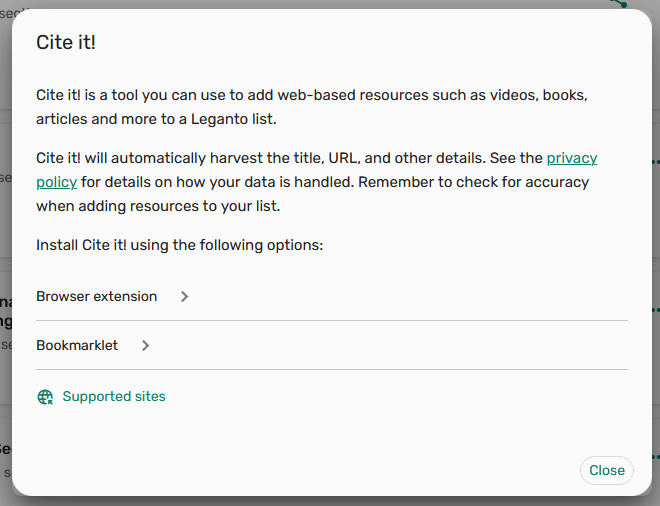
The default description has been updated with an additional sentence directing users to the privacy policy for more information about how their data is handled. This updated text applies only to institutions that have not customized the cite.it.description.bottom label.
This update improves transparency by helping users better understand how their data is handled when using Cite it! to add resources to lists. URM-330031
-
September 2026 Leganto New field LCCN is available in the following Analytics Subject Areas. It allows institutions to report on and analyze items using the LCCN value stored with Leganto items.
-
Course Reserves > Citation Metadata Details
-
Leganto Instructor Usage Events > Citation Metadata Details
-
Leganto Student Usage > Citation Metadata Details
For more details, see Course Reserves, Leganto Instructor Usage Events, and Leganto Student Usage. URM-331313
-
Resolved Issues
| SF number | Description |
|---|---|
| / URM-329736 | Leganto Analytics performance was slow when working with longer lists, causing some reports to take several minutes to load. The underlying API queries were optimized, significantly improving report loading times and providing faster access to Analytics data. |
| 10594676 URM-330234 | When viewing an item's full details, navigating to another item through links sometimes caused the list view to incorrectly return to the previously selected item. This was fixed so that the list view now correctly updates to display the item selected by the user when navigating between items. |
| 10573268 URM-330021 | Exporting a list as a Word file generated an .rtf file instead of the expected .docx format. This was fixed so that Word exports now generate .docx files. |
| 08431547 URM-329345 | When scrolling through a list containing sections with text descriptions, the page could flicker during navigation. This was fixed so that users can now scroll through lists with descriptions without experiencing flickering. |
| 08349310 URM-325489 | Items in some lists could be reordered unexpectedly when tags were added or when existing tags were displayed. This was fixed so that items now maintain their correct regardless of tags. |
| 08164672 URM-316567 | When adding CDI records without an MMS ID to a list, Primo and Leganto could retrieve different resources for the same search result, causing incorrect availability information. This was fixed. |
